Pressing Esc froze VizShot for good
A shortcut library calls your handler while it holds its own lock, and cancelling a screenshot needed that lock. How one key press hung an app.

The first time Esc was pressed to cancel a screenshot in what became VizShot 1.0, VizShot stopped answering. It didn't crash. It hung, and it never came back.
It turned up in testing, before 1.0 went out to anyone.
I'll tell you what it was, because the shape of the mistake is easy to make in any language, and I made it in a very ordinary way.
Why Esc is a global shortcut
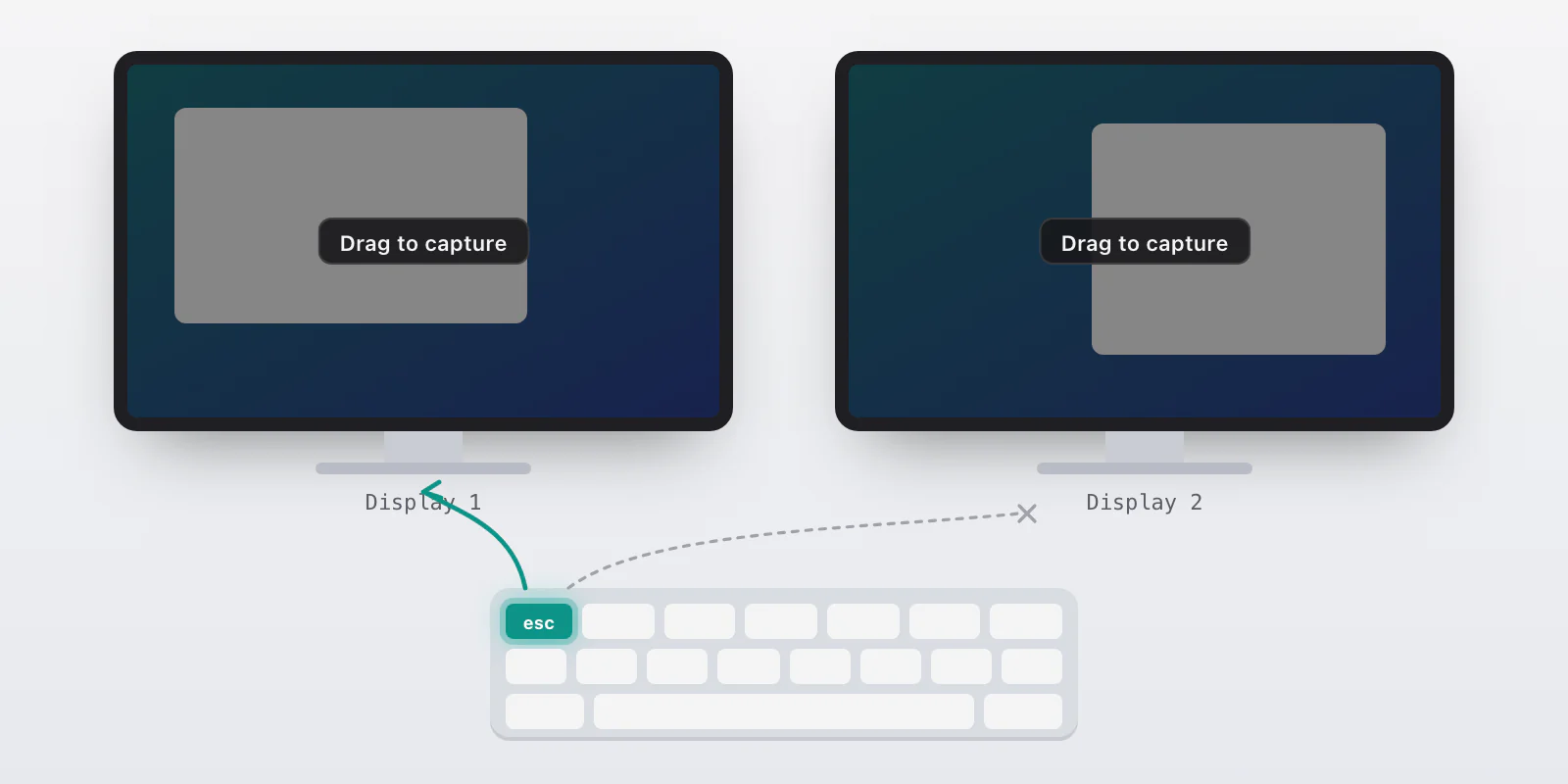
When you press the screenshot shortcut, VizShot freezes the screen and puts a dimmed overlay on it, and you drag. Esc should cancel. Simple enough: the overlay window listens for Esc.
With one display that works. With two, it doesn't, always. The overlay is one window per display, and a key press goes to the front window only. On a Mac, with two displays, the front window is not always the one under your pointer. So you press Esc, the other display's overlay is the front window, and it gets the key. The one you're looking at doesn't. You cancel nothing, and then you're not sure the app saw you.
The fix is to take Esc for the whole system, for as long as the selection is up. VizShot registers Esc as a global shortcut when the overlay opens, and gives it back when any overlay closes. I'm careful about that second half, because if it were held a moment too long, Esc would stop working in every other app.
What the freeze was
Global shortcuts in VizShot come from a library, tauri-plugin-global-shortcut. You register a key and give it a function. When the key is pressed, the library calls your function.
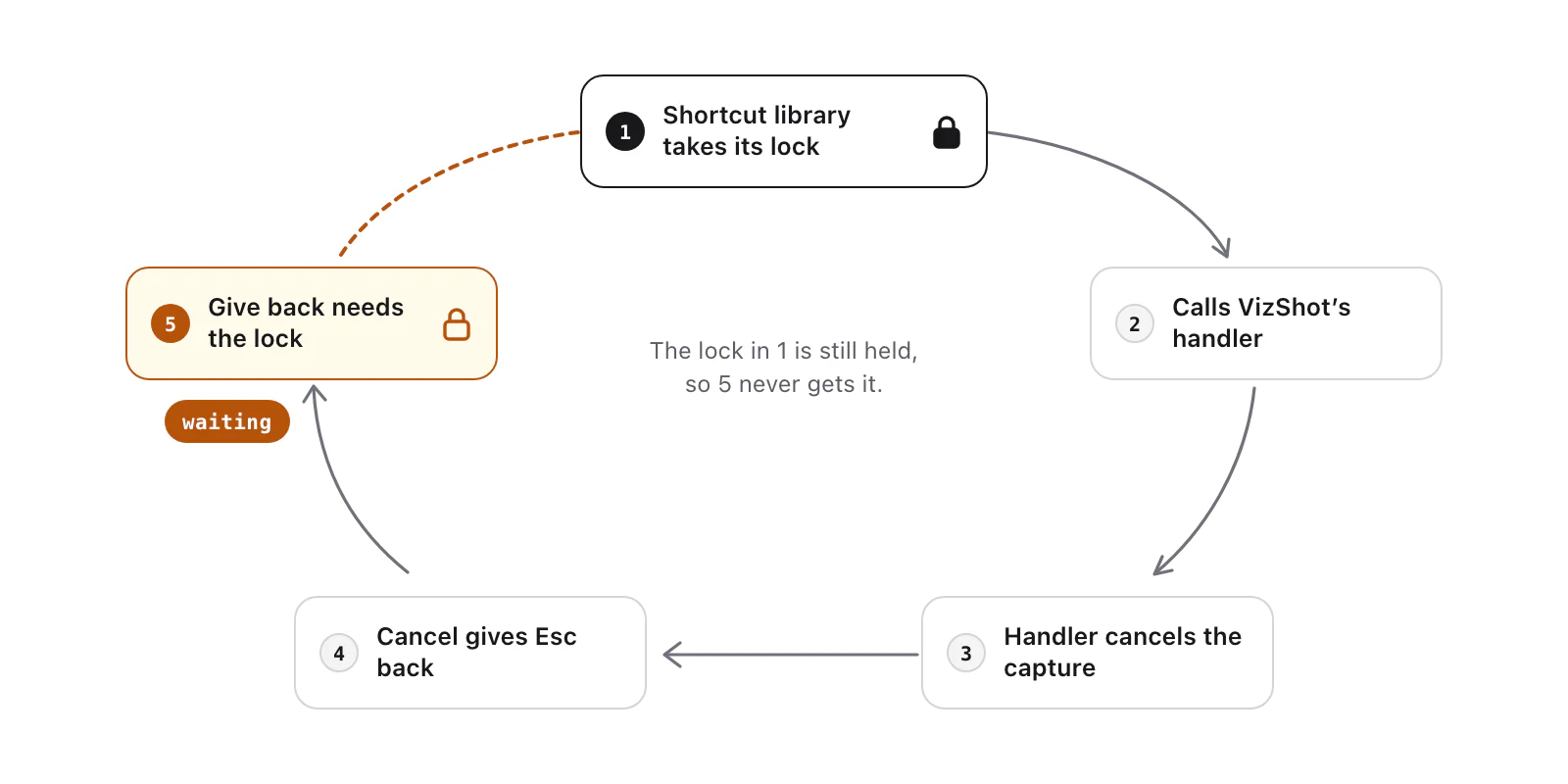
Here's the part I hadn't looked at. In the version I use, 2.3.2, the library keeps its registered shortcuts in a map behind a mutex. When a key is pressed, it takes the mutex to look the shortcut up, and calls your function while it still holds the lock. I read the source to be sure. The lock is taken in the condition of an if let, and in Rust that guard lives until the end of the block, so it is still there when the handler runs.
Now follow my Esc handler:
Esc is pressed. The library takes its lock and calls my handler.
My handler cancels the selection, right there.
Cancelling the selection ends the selection, and ending it gives Esc back, which means unregistering the shortcut.
Unregistering takes the library's lock. The same thread already has it.
A standard mutex in Rust doesn't let the same thread in twice. It waits for itself. Nothing was wrong with any one line, and no thread was fighting another. One thread was waiting for itself, for ever.
The tool that showed it was sample, the Mac command that looks at what every thread of a running program is doing, and the one to reach for with any hang. It showed the thread inside release_escape, which is my function that gives Esc back, waiting on that lock.
The fix
The handler now only decides. If the selection is up, it starts a new thread to do the cancelling, and returns at once:
// This runs inside the shortcut library's lock, and giving Esc back takes
// that lock: done here, it hung the app for good.
let app = app.clone();
std::thread::spawn(move || {
    if active {
        crate::commands::cancel_capture(app, generation);
    } else {
        // Nothing is up after all: give Esc back rather than keep it.
        release_escape(&app);
    }
});
The handler returns, the library lets go of its lock, and the new thread can take it when it needs to. That is the rule I wrote in my notes for this project: a handler only decides; anything that can register or unregister runs on a thread of its own. The capture shortcuts have always done it that way. The Esc one was new.
What I'd check in your own code
Any callback a library makes while it holds a lock is a place your code must not call back into that library. Read what the library does around the call. The documentation rarely says.
Giving something back is a call into the library too. The handler never registered anything itself. The cancel it called did, one step down, by unregistering.
Look for the next one. Esc was one handler. Search your code for any other that registers or unregisters inside a callback.
The plugin's development branch no longer holds the lock while it calls your handler (I read it on 19 October 2026), so you may not meet this on a newer release. VizShot's fix doesn't rely on that: the cancel now runs on a thread of its own, outside the handler, so it's safe on any version.
One small thing
On Mac, VizShot 1.0 cancels on every display now with a single press, and the first Esc doesn't hang. It's a tiny change that you'd only notice if it was wrong. VizShot is $8 once, for Mac and Windows, with a 14-day free trial.
Try VizShot free for 14 days. Then $8 once, and one key covers two of your computers.