MOV vs MP4 for screen recordings

A screen recording from the Mac's own tools is a .mov file. Windows's Game Bar and Snipping Tool save .mp4 files. If a website or app won't take your MOV, convert it. On a Mac that can be as quick as changing the end of the file's name.
What's the difference between MOV and MP4?
Both are containers: a file that wraps the video, the sound and a little extra information. The Library of Congress describes the QuickTime format, which is what .mov is, as a file format that wraps video, audio and other bitstreams, and says the MP4 file format owes a debt to it. MOV is Apple's. Apple's page on the classic QuickTime file format says that specification is the document the original MP4 specification was based on, so the two are close relatives.

What matters day to day is who accepts the file. Apple's page on converting a MOV to MP4 says you may want to so you can upload the video to websites, or open it in other apps, that don't support MOV files.
Is MP4 better quality than MOV?
Not by itself. How the picture looks and how big the file is come from the video inside the container, which is compressed with a codec. Apple's pages name two for the Mac, H.264 and HEVC. When you change the end of an H.264 MOV file's name to .mp4, Apple says "the resolution of the video and size of the MP4 file will be the same as the original MOV file". The container changed, and Apple says the resolution and the size didn't.
On supported Macs with macOS Tahoe 26 or later, Apple's page says the Screenshot toolbar lets you capture in SDR, which uses H.264, or in HDR, which uses HEVC. Apple's steps for converting start by checking the codec.
What do Mac and Windows save?
| Tool | File it saves | Where |
|---|---|---|
| The Mac's Screenshot app (QuickTime Player's File › New Screen Recording opens it) | .mov | Your desktop by default |
| Windows's Xbox Game Bar | .mp4 | Videos › Captures |
| Windows 11's Snipping Tool video snip | .mp4 | Videos › Screen Recordings, by default |
Those come from Apple's page on recording the screen and its QuickTime Player guide, and from Microsoft's pages on the Game Bar, the Snipping Tool and keyboard shortcuts. How to stop screen recording on a Mac and the Windows 10 screen recorder cover the two tools.
How do I convert MOV to MP4 on a Mac?
Start with Apple's quick way, which only works if the video uses H.264:
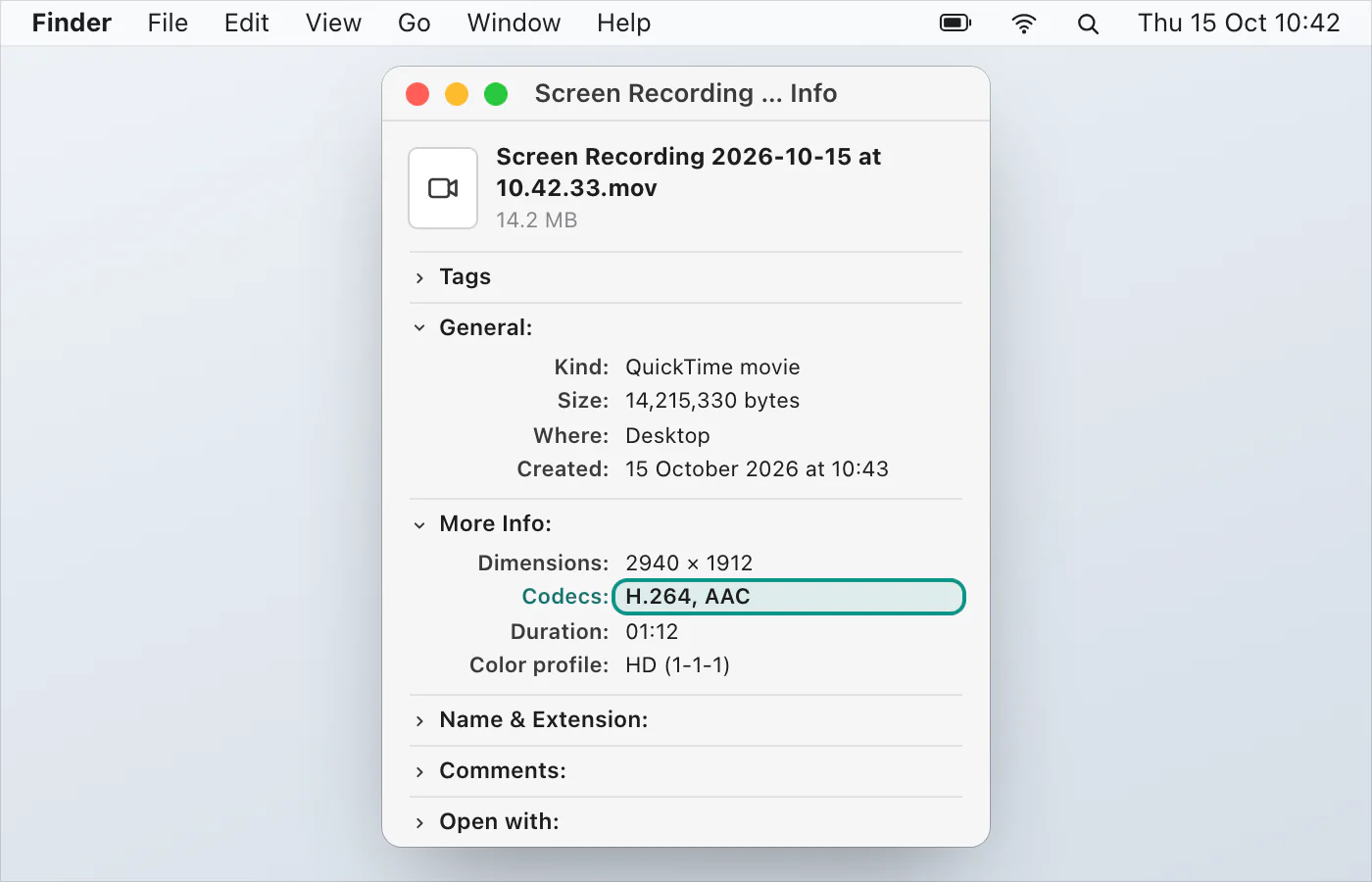
In the Finder, select the file and choose File › Get Info. Under More Info, check that one of the Codecs is H.264. If it's anything else, skip to iMovie below.
To keep the original, Control-click the file and choose Duplicate.
Control-click the copy and choose Rename.
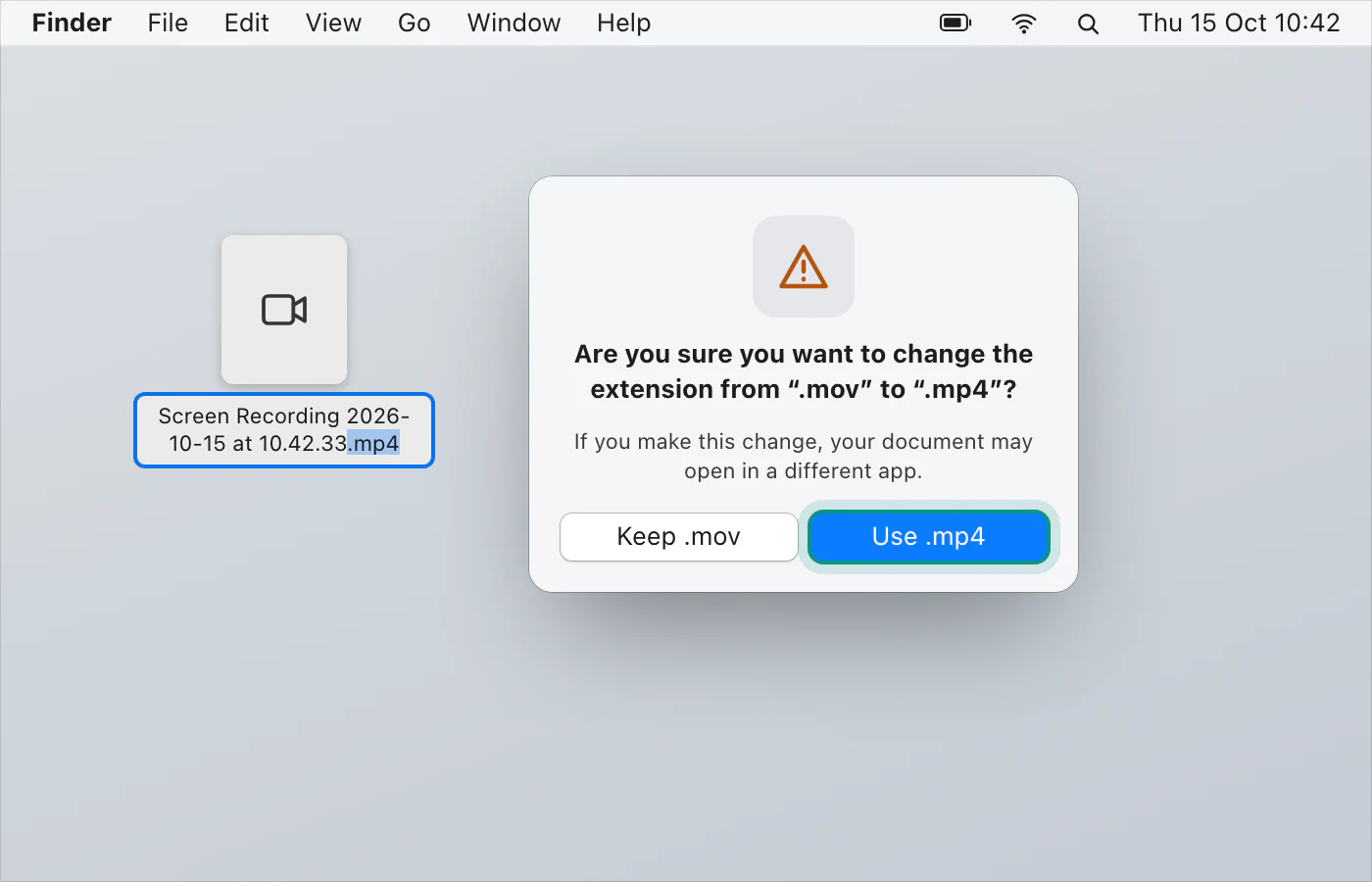
Change the ending from mov to mp4 and press Return.
Choose Use .mp4.
Apple says the file type changes but the resolution and size stay the same. If the file still won't upload, Apple says to use iMovie on the original MOV. In iMovie, click Create New in Projects view and choose Movie. Click Import, select the MOV file and click Import Selected. Select it in the browser and choose Edit › Add to Movie (or press the E key). Then click Share and choose Export File. To make the file smaller, choose Medium or Low in the Quality menu, or a lower resolution. Click Next, choose where to save the MP4, and click Save.
Don't look for the option in QuickTime Player. Apple's page on exporting movies says it exports a QuickTime movie (.mov) with H.264 or HEVC and doesn't export movies as MP4 videos. For more control, Apple points to Final Cut Pro and Compressor, both from the Mac App Store.
Do you need to convert at all?
If the recording plays where you need it and uploads without a complaint, leave it as it is. The ending on a file's name doesn't make it any sharper.
A recording that's already an MP4
VizShot saves its recordings as MP4 on both Mac and Windows, so there's nothing to convert. After the 14-day free trial, recording needs a key. Record your screen has the steps, recording with sound on a Mac covers the audio, and you can download VizShot.
$8, once, for two computers.
Questions
Which is better for a screen recording, MOV or MP4?
MP4 is the safer one to share, because Apple's page says some websites and apps don't support MOV. Neither is better quality by itself.
Can I just rename .mov to .mp4?
On a Mac, Apple says you can if the video uses H.264. Check it under File › Get Info › More Info. For any other codec, use iMovie.
Why is my Mac screen recording a .mov file?
Because that's what Apple's tools save: its Mac User Guide says screen recordings are saved as .mov files.
Does QuickTime Player export MP4?
No. Apple's page says it exports a QuickTime movie (.mov) using H.264 or HEVC, and doesn't export movies as MP4 videos.
Will converting make the file smaller?
Renaming won't. Apple says the size stays the same. To shrink the file, export from iMovie and choose Medium or Low quality, or a lower resolution.
Checked against
- Apple: Convert a MOV file to MP4 on Mac, read 14 October 2026
- Apple: Export movies to other file formats and resolutions using QuickTime Player on Mac, read 14 October 2026
- Apple: QuickTime (Classic), read 14 October 2026
- Library of Congress: QuickTime File Format, read 14 October 2026
- Library of Congress: MPEG-4 File Format, Version 2, read 14 October 2026
- Apple: Take screenshots or screen recordings on Mac, read 14 October 2026
- Apple: Record your screen in QuickTime Player on Mac, read 14 October 2026
- Microsoft: Use Snipping Tool to capture screenshots, read 14 October 2026
- Apple: How to record the screen on Mac, read 14 October 2026
- Microsoft: Use a screen reader to record your screen with Xbox Game Bar, read 14 October 2026
- Microsoft: Keyboard shortcuts in Windows, read 14 October 2026