Where are screenshots saved on Windows 11?

Where a screenshot goes depends on how you took it. Windows keyPrint Screen saves a file in Pictures › Screenshots. Print Screen copies the picture to the clipboard, so you paste it, and so does Windows keyShiftS. Microsoft's Snipping Tool page says a snip is saved to "your Screenshots folder" and doesn't say where that is. Windows keyAltPrint Screen in the Xbox Game Bar saves a PNG in Videos › Captures.
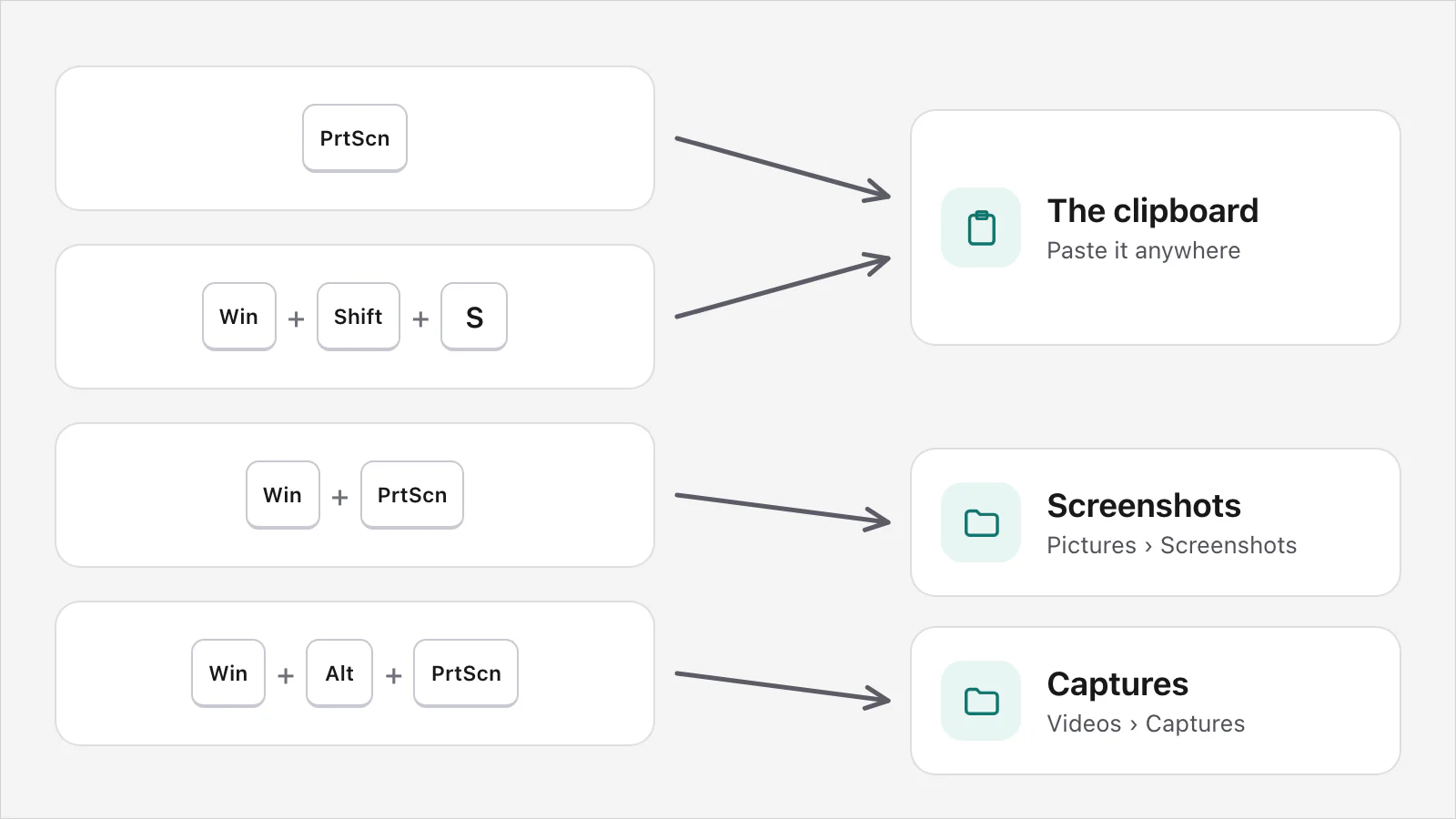
The ways Windows takes a screenshot, and where each goes
| How you took it | Where it goes | What Microsoft says |
|---|---|---|
| Print Screen | The clipboard | Microsoft's pages differ on what it captures. The keyboard shortcuts page says that on Windows 11 it selects a region, with a setting to turn that off. The Microsoft 365 page and the Snipping Tool page say it captures the entire screen. |
| AltPrint Screen | The clipboard, for the active window only | Microsoft's page for Microsoft 365 and its keyboard shortcuts page. |
| Windows keyPrint Screen | A file in Pictures › Screenshots | Microsoft's keyboard shortcuts page. |
| Windows keyShiftS | The clipboard. Selecting the notification opens the Snipping Tool editor | Microsoft's page for Microsoft 365. Its Snipping Tool page lists the shortcut too, and says a snip is saved to your Screenshots folder. |
| The Snipping Tool | "Your Screenshots folder", and the Snipping Tool window | Microsoft's Snipping Tool page says a snip is saved to your Screenshots folder automatically, and copied to the app's window. It doesn't say where that folder is. |
| Windows keyAltPrint Screen (Game Bar) | A PNG in Videos › Captures | Microsoft's page on the Xbox Game Bar, whose steps start by turning the Game Bar on. |
The Microsoft 365 page for Windows keyShiftS mentions only the clipboard, and the Snipping Tool page says a snip is saved to your Screenshots folder. Neither says how the two fit together. If you used the shortcut and can't find a file, paste first, then look in Screenshots under Pictures. Some devices have other combinations: Microsoft's page on the Print Screen shortcut says you may use Fn + Windows logo key + Space Bar on a device with no Print Screen key.
How to find the Screenshots folder
Open File Explorer from the taskbar.
In the side pane, select Pictures.
Select Screenshots.
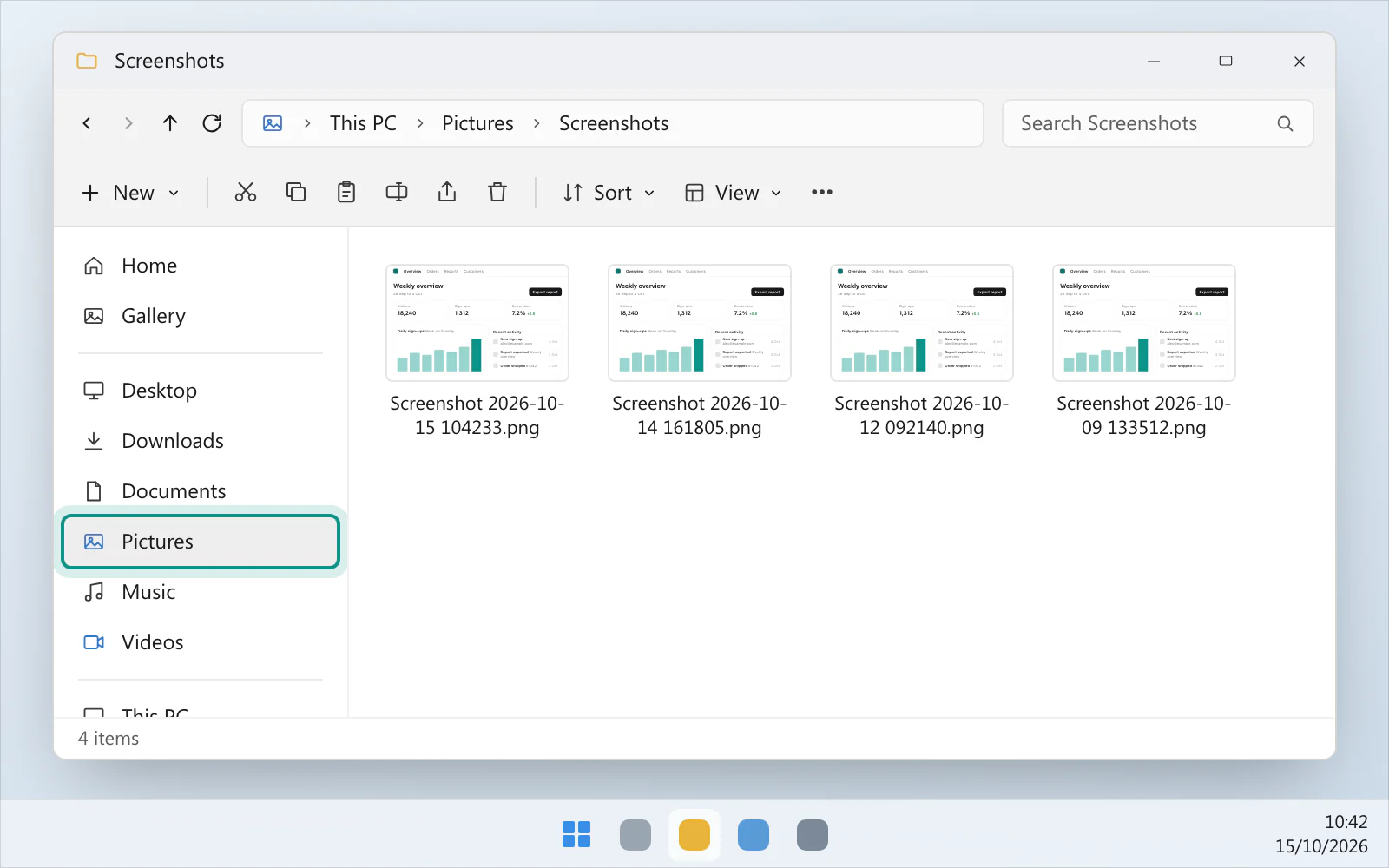
That's the route in Microsoft's page on the Print Screen shortcut. Microsoft Learn's reference for the folder gives its default as a Screenshots folder inside the Pictures folder of your user profile (%USERPROFILE%\Pictures\Screenshots). "Default" matters. In its section on environment strings such as %USERPROFILE%, the same reference says that in some cases the example paths it gives might not match those on a particular computer, because of choices made during installation or later folder redirection.
Can't find one? Check these in order
Pictures › Screenshots. Windows key + Print Screen saves there, and Microsoft's Snipping Tool page says its snips go to "your Screenshots folder", without saying where that is.
The clipboard. Open Paint or a chat and press CtrlV. Print Screen, Alt + Print Screen and Windows key + Shift + S all copy the picture to the clipboard.
The Snipping Tool. Open it from the Start menu. A snip you just took may still be in its window.
Videos › Captures. The Game Bar's screenshots and recordings go there.
OneDrive. If your Pictures folder is backed up to OneDrive, see the next sections.
If Print Screen did nothing at all, Print Screen not working on Windows 11 is the page for that, and Snipping Tool not working is for the app.
How to change where they go
For the Snipping Tool, Microsoft's page says to select See More, then Settings. There you can change the automatic save behaviour or the default Screenshots folder.
Microsoft doesn't document moving the folder Windows keyPrint Screen saves to, so there are no steps here. Saving screenshots automatically on Windows 11 is the page for sending them somewhere on purpose.
Do my screenshots go to OneDrive?
Maybe. Microsoft's page on saving screenshots to OneDrive automatically says the "Save screenshots to OneDrive" feature is no longer available in the OneDrive settings. If a guide tells you to switch it off in the OneDrive settings, Microsoft's page says that option is no longer there. The page says that to make sure your screenshots are backed up, your Pictures folder has to be part of your OneDrive.
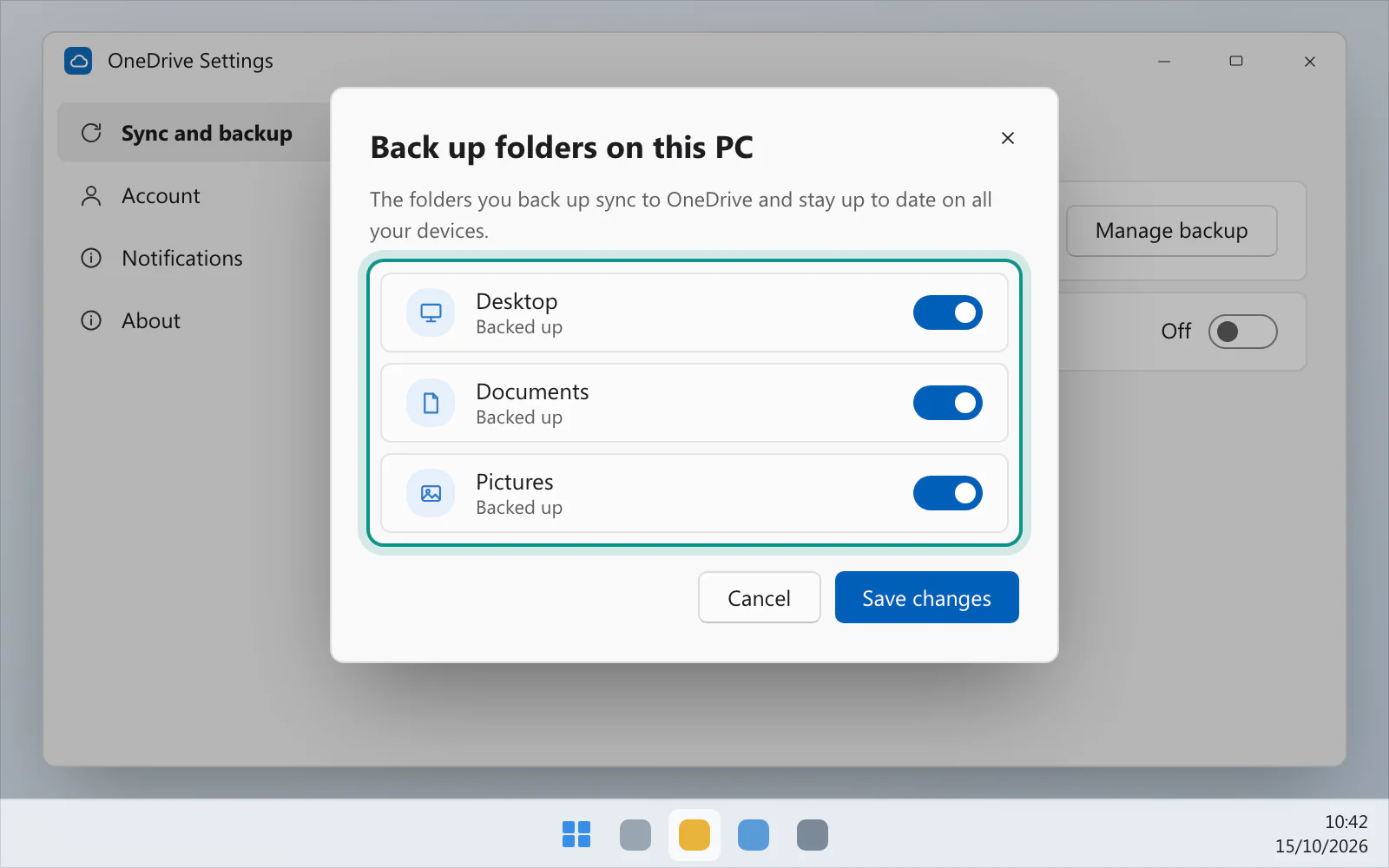
So the question is whether Pictures is backed up. Open OneDrive's settings from the cloud icon in the notification area (Help & Settings, then Settings), go to Sync and backup and select Manage backup. Microsoft's page on backing up your folders says this shows which folders are backed up.
How to stop OneDrive keeping my screenshots
There are two sourced ways, and they do different things.
Stop backing up Pictures. In Manage backup, turn the Pictures switch off. This is for the whole folder, not just screenshots. Microsoft's page then asks you to choose: keep the files only in OneDrive, removing them from your computer, or keep them only on your PC, removing them from OneDrive. Read the two choices before you pick one.
Move the files out of the OneDrive folder. Microsoft's page on deleting files says to use File Explorer to move a file outside your OneDrive folder to another folder on your computer, if you want it on the PC but not on OneDrive. To delete a screenshot from both, find it in File Explorer and delete it. If you've shared it, Microsoft says, deleting it deletes it for everyone.
A faster way, if you take a lot of screenshots
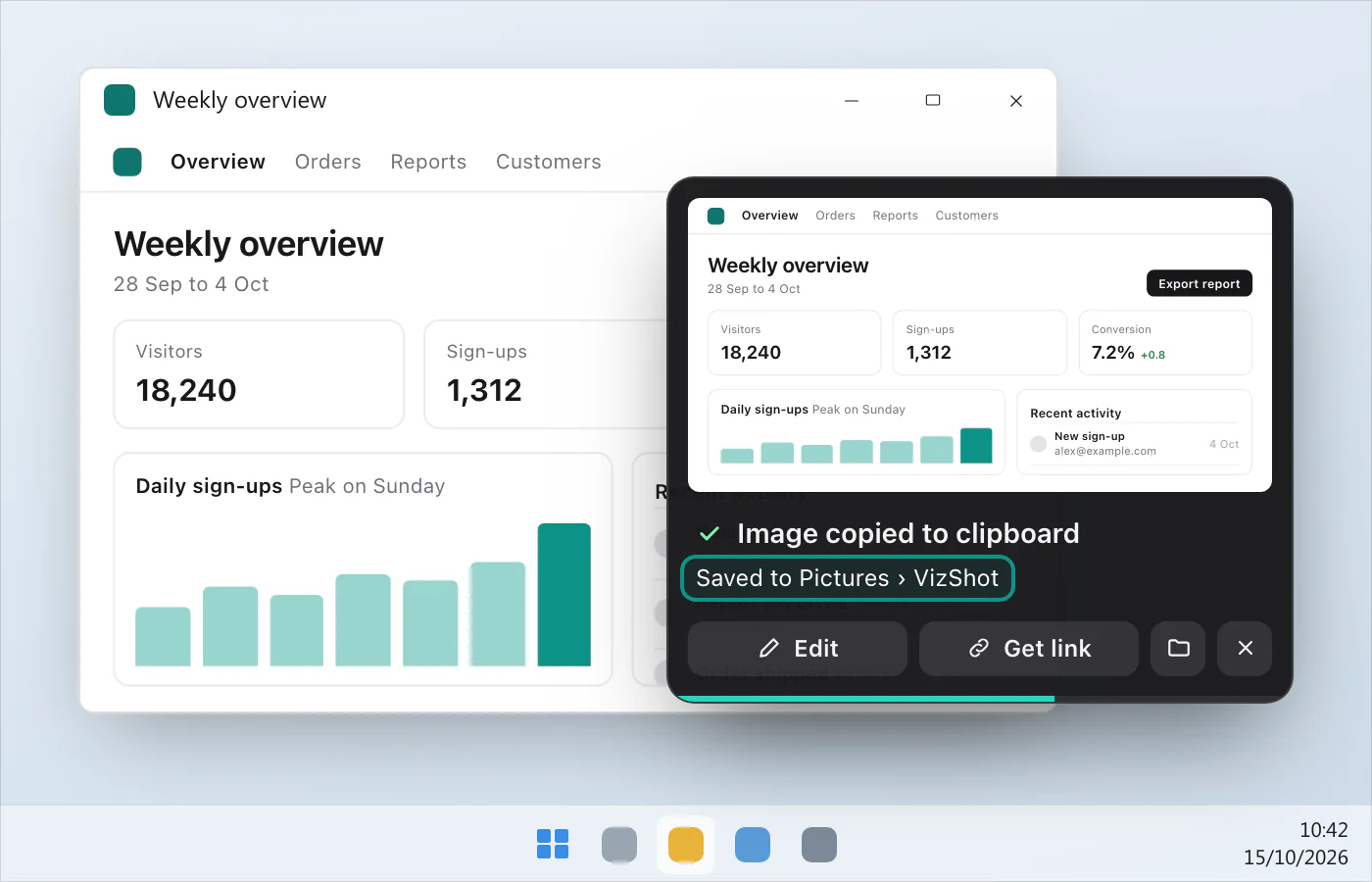
VizShot puts every screenshot on your clipboard and saves it in a folder called VizShot inside Pictures, both at once, so there's no hunting. Recent Captures shows your latest 40, and you can pick another folder under Settings › Capture › Save captures to. After the 14-day free trial a screenshot is still copied to the clipboard, but saving needs a key. Where do my screenshots go? has the details, and you can download VizShot.
$8, once, for two computers.
Questions
Where are screenshots saved on Windows 11 by default?
It depends on the shortcut. Windows keyPrint Screen saves in the Screenshots folder in Pictures, and the Snipping Tool saves to "your Screenshots folder". Print Screen copies to the clipboard, and so does Windows keyShiftS.
Where do Print Screen screenshots go?
To the clipboard, Microsoft's pages say. Paste with CtrlV. For a file, use Windows keyPrint Screen. Screenshot shortcuts for Windows has them in one table.
Where do Snipping Tool screenshots go?
To "your Screenshots folder", Microsoft's page says, and to the app's window. Change the folder under See More › Settings.
Where do Xbox Game Bar screenshots go?
To the Captures folder under Videos, as PNG files, once the Game Bar is turned on. Microsoft's page names Windows keyAltPrint Screen as the shortcut.
How do I stop OneDrive saving my screenshots?
Stop backing up your Pictures folder under Manage backup, or move the files out of your OneDrive folder. The two sections above explain the difference.
Where do screenshots go on a Mac?
To the desktop, by default. Where do screenshots go on a Mac? has the rest.
Checked against
- Microsoft: Copy the window or screen contents, read 15 October 2026
- Microsoft: Keyboard shortcuts in Windows, read 15 October 2026
- Microsoft: Keyboard shortcut for print screen, read 15 October 2026
- Microsoft: Use Snipping Tool to capture screenshots, read 15 October 2026
- Microsoft: Use a screen reader to record your screen with Xbox Game Bar, read 15 October 2026
- Microsoft Learn: KNOWNFOLDERID (Knownfolders.h) - Win32 apps, read 15 October 2026
- Microsoft: Save screenshots to OneDrive automatically, read 15 October 2026
- Microsoft: Back up your folders with OneDrive, read 15 October 2026
- Microsoft: Delete files or folders in OneDrive, read 15 October 2026
- Apple: Take a screenshot on Mac, read 15 October 2026